

Best Practices for YouTube Premiere Engagement
YouTube Premieres are a powerful way to turn pre-recorded videos into live events, creating shared experiences and real-time interaction. They allow creators to schedule videos, build anticipation, and engage with their audience through live chat during the event. Here's how to make the most of it:
- Pre-Launch: Use eye-catching thumbnails, keyword-rich titles, and schedule your Premiere at peak audience times (use YouTube Analytics for insights). Promote it across social media, email, and YouTube’s Community tab to maximize attendance.
- During the Premiere: Actively engage in live chat by welcoming viewers, responding to comments, and using polls or pinned messages to guide interaction. Host live Q&A sessions to keep the audience involved.
- Post-Premiere: Analyze the video’s performance using YouTube Studio metrics. Update descriptions with timestamps, refresh thumbnails, and optimize for on-demand viewers. Continue engaging with comments to sustain interest.
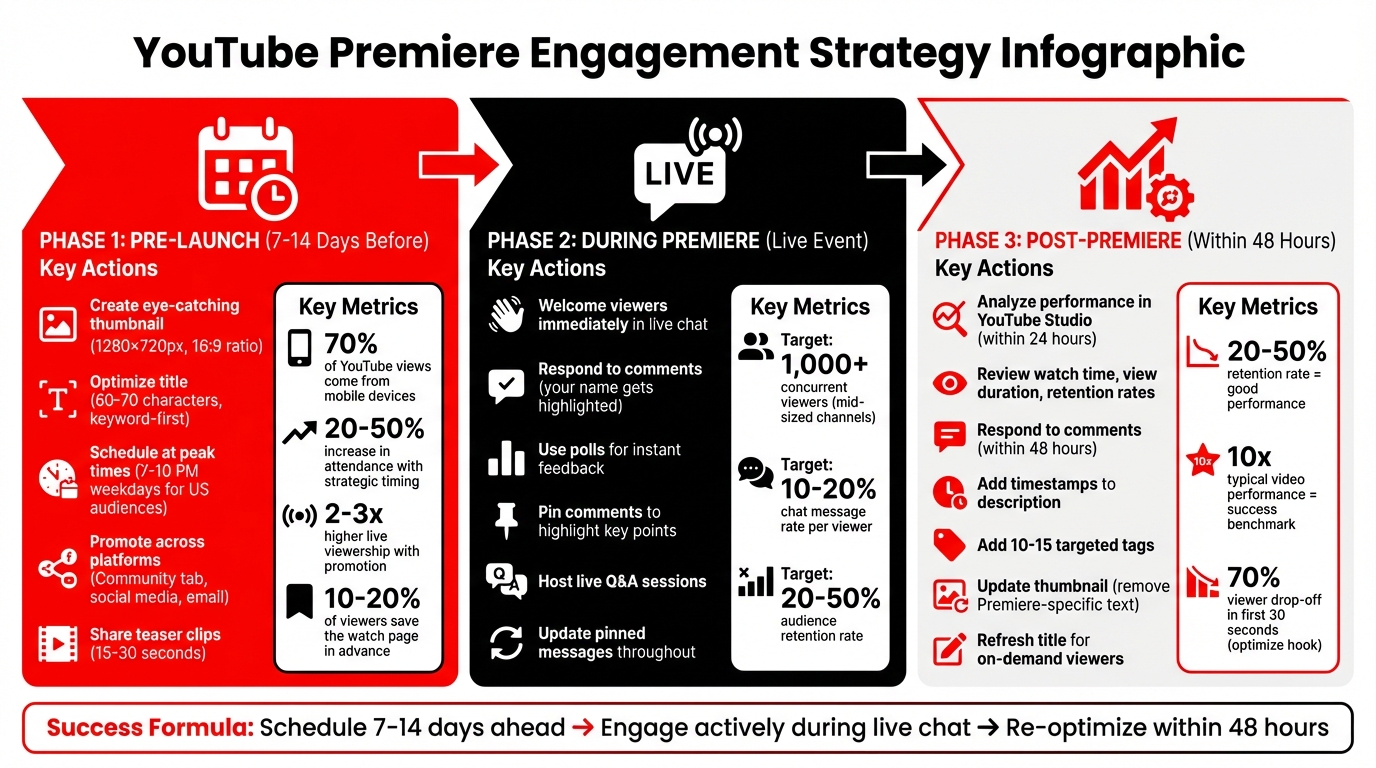
YouTube Premiere Strategy: 3-Phase Workflow for Maximum Engagement
How to Use YouTube Premieres to Boost Engagement
sbb-itb-08cadfc
Pre-Launch Strategies for YouTube Premieres
The success of your YouTube Premiere often hinges on your pre-launch efforts. From your thumbnail and title to timing and promotion, every detail plays a role in building excitement and ensuring strong attendance. Let’s break it down.
Creating an Effective Thumbnail and Title
Your thumbnail and title are the first things viewers notice, so they need to grab attention immediately. For thumbnails, focus on high-contrast colors, bold text overlays (stick to 3–5 words), and close-up shots of faces showing clear emotions. Stick to the recommended 1280×720 pixels with a 16:9 aspect ratio. Since 70% of YouTube views come from mobile devices, keep the design clean and uncluttered to ensure it stands out on smaller screens.
When it comes to titles, aim for 60–70 characters and place your main keyword at the start. Use engaging words like "Ultimate", "Secrets", or "Revealed" to spark curiosity. Adding phrases like "Live Premiere Reveal" can emphasize the exclusivity of your event. Tools like Outlier can help analyze competitor content and generate data-driven title suggestions with confidence scores in just minutes, giving you an edge in your niche. Additionally, consider testing 3–5 thumbnail variations through YouTube’s A/B testing feature to determine which design resonates most with your audience.
Once your visuals and titles are optimized, the next step is to schedule your Premiere at the best possible time.
Scheduling Your Premiere at the Right Time
Timing is everything when it comes to live events. Use YouTube Analytics’ "When your viewers are on YouTube" heatmap to identify when your audience is most active. For US-based viewers, evenings between 7–10 PM on weekdays or weekend afternoons are typically the best times. If you have a global audience, focus on the time zones where the majority of your viewers are located.
Plan to schedule your Premiere 7–14 days in advance. This gives you enough time to promote the event and build anticipation. Data shows that creators who strategically choose their time slots see a 20–50% increase in live attendance compared to those who schedule randomly. Outlier can also analyze competitors’ successful Premiere schedules, offering personalized recommendations based on real-world performance data.
With your timing locked in, it’s time to focus on spreading the word.
Promoting Your Premiere in Advance
Promotion is key to building excitement and driving viewers to your Premiere. A multi-channel approach works best to maximize reach. Start by posting updates on YouTube’s Community tab 3–7 days before the event, sharing teasers to spark interest. Use platforms like Twitter (or X) for countdown threads and Instagram Stories for behind-the-scenes glimpses. Don’t forget your email list - these subscribers are often your most loyal viewers, so send them the watch page URL directly.
Short-form teaser clips (15–30 seconds) can also be effective. Share these as YouTube Shorts or Instagram Reels to grab attention. Additionally, take advantage of YouTube’s built-in reminder system, which automatically notifies viewers 30 minutes before your Premiere starts. Promoted Premieres often see 2–3 times higher live viewership, with 10–20% of viewers saving the watch page in advance.
Engagement Tactics During the Live Premiere
Turn your Premiere into more than just a passive viewing experience - make it an interactive event that draws your audience in. The live chat is your secret weapon for building a sense of community, and being actively involved shows your viewers that their presence matters.
Making the Most of Live Chat
Live chat is where the magic happens. Start engaging right away by welcoming viewers, asking questions, and using polls to spark interaction. When you reply to comments, your name gets highlighted, making it clear that you're participating in real-time. This direct interaction is a big reason people tune in live instead of just watching later. Polls are another great tool to gather instant feedback while the video plays. To keep your audience focused, use pinned comments to guide them through the experience.
Pinning Comments to Highlight Key Points
Pinned comments are your go-to for keeping important messages front and center, no matter how busy the chat gets. Use this space to prompt specific actions - like subscribing, exploring related videos, or visiting links in the description. Keep these comments relevant by updating them throughout the Premiere. For instance, pin a comment about your merch store when it's mentioned in the video, then switch to a discussion question during a natural pause in the content.
Hosting a Live Q&A or Discussion
Take audience engagement a step further with a live Q&A or discussion. Focus on topics that resonate with your viewers to keep them involved. If you're using tools like Outlier to analyze your best-performing videos, let that data guide your discussion topics. This ensures you're addressing what your audience already cares about, keeping the conversation lively and relevant throughout the Premiere.
Post-Premiere Strategies for Continued Engagement
The Premiere might be over, but the journey for your video’s success is just beginning. What you do in the hours and days following the event can significantly impact its long-term performance. Think of the Premiere as the starting line, not the finish.
Analyzing Premiere Performance
Dive into YouTube Studio analytics within the first 24 hours after your Premiere. Pay close attention to metrics like watch time, average view duration, and retention rates to gauge how well your audience stayed engaged. A good benchmark for success is an audience retention rate of 20-50%. For mid-sized channels, hitting 1,000+ concurrent viewers and a 10-20% chat message rate per viewer are strong indicators of an effective Premiere.
If retention drops below 50%, check the retention graph to pinpoint where viewers began losing interest. Export your data as a CSV file for more detailed analysis. Use the "Premiere" filter under traffic sources to see how many people tuned in live versus those who found the video later.
Compare your Premiere’s performance to your typical videos. Did it outperform by a factor of 10? That’s a key metric of success. For more context, measure your results against channels of a similar size within your niche. Tools like Outlier can help identify patterns in your post-Premiere data and suggest strategies for improvement, such as refining titles with high-confidence hooks (e.g., "Top 5 Lessons from Our Live Premiere" scoring an 85% click-through rate)[context]. Use these insights within 48 hours to tweak your approach while the data is still fresh, setting the stage for your next steps.
Encouraging Post-Premiere Discussions
Once you’ve reviewed your analytics, shift your focus to keeping the conversation alive. Respond to comments within 48 hours to show viewers you’re engaged. Ask them about their favorite moments or pose follow-up questions related to the video. Did a specific part of the Premiere spark a lot of chat activity? Use that as inspiration for a community post or even a follow-up video. This keeps the momentum going and signals to YouTube’s algorithm that your video is still driving engagement, which can help push it to a broader audience.
Re-Optimizing the Video for On-Demand Viewers
Your performance data is a goldmine for making your video more appealing to on-demand viewers. Start by updating the description with timestamps for key moments (e.g., "0:00 Intro, 5:30 Q&A") and adding 10-15 targeted tags like "YouTube Premiere recap" or other niche-specific terms. Revamp your thumbnail to remove any Premiere-specific text and ensure it grabs attention. Update the title using high-CTR suggestions from tools like Outlier.
This shift from Premiere-focused content to evergreen optimization ensures your video remains relevant and continues to attract viewers long after the live event has ended.
Using Outlier to Improve Your Premiere Strategy
To make your Premiere strategy more effective - whether it's pre-launch, live, or post-event - data from Outlier can be a game-changer. A successful Premiere isn't about taking shots in the dark; it's about using insights to focus on what your audience already loves. Outlier analyzes competitor performance to identify standout videos - those that perform 3 to 10 times better than average. This lets you shape your Premiere around proven topics, formats, and emotional triggers that resonate in your niche.
How Outlier Can Improve Your Strategy
Outlier turns raw data into actionable steps, helping you make smarter decisions. By analyzing high-performing videos from competitors, the platform's AI generates personalized video ideas, complete with titles, hooks, and confidence scores. These ideas are based on tested hook structures and recent trends. Outlier highlights five content patterns that consistently grab attention: "The Hidden Problem", "The Beginner's Secret", "The Myth Buster", "Behind the Scenes," and "Immediate Gratification." For example, a title like "Why [Popular Belief] Is Actually Hurting You" uses the "Myth Buster" approach, which is known to boost click-through rates.
Since 70% of viewers drop off within the first 30 seconds of a video, testing your Premiere's opening hook against successful examples in your niche can help keep viewers engaged during the live broadcast. Outlier also pulls effective title formulas from competitors, such as "How to [Outcome] (Without [Pain])" or "I Tested [X] for [Time Period]" - giving you titles that build excitement and anticipation for your Premiere landing page.
Using Data to Plan Better Premieres
Outlier's Content Matrix feature maps out topics and formats, revealing areas of high demand with little competition. This helps you find unique angles for your Premiere. For instance, if competitors are focusing on a popular topic with tutorials, you could stand out by creating a "Behind the Scenes" Premiere that offers a fresh take.
The platform also tracks when competitors upload their videos, analyzing dates and times to show when your audience is most active. You can either schedule your Premiere to match these patterns or take a different approach by choosing low-competition time slots. After the Premiere, evaluate its performance - did it overdeliver compared to your channel's usual metrics? If so, pinpoint the successful elements and replicate them in future content. This data-driven approach ensures every phase of your Premiere strategy is fine-tuned for maximum engagement.
Outlier offers a free plan with 10 personalized video ideas, while the OutlierKit subscription starts at $9/month, providing advanced tools for competitor and keyword research.
Conclusion and Key Takeaways
YouTube Premieres shine when treated as special live events rather than just another video upload. Success hinges on managing three key phases: building anticipation, engaging during the live chat, and optimizing the video for on-demand viewers. To maximize visibility, announce your Premiere at least 24 hours ahead of time, but aim to schedule the start one to three hours before launch to keep the excitement alive.
Active participation in live chat is crucial. Engaging with your audience before, during, and after the Premiere fosters a sense of community. As YouTube Creators explains, Premieres allow your audience to enjoy videos together in real time. Music artist Leroy Sanchez provided a great example of this with his video "Preacher." He went live across all his social channels just before the Premiere, personally inviting fans to join the watch page, which boosted real-time engagement.
Once the live interaction wraps up, shift your focus to post-event strategies. Use Premieres sparingly for your most important releases to keep them feeling special. Afterward, enhance the video with updated cards, end screens, and chat replay, and dive into the analytics to fine-tune your approach for future Premieres.
FAQs
How do I choose the best time for a Premiere?
To get the most out of a YouTube Premiere, pick a time when your audience is most active online. This can increase early engagement through views, comments, and even suggested video traffic, giving your video a better chance to stand out. Pay close attention to when your viewers typically watch content to ensure your Premiere gets the best possible start. Early activity can make a big difference in how far your video reaches.
What should I do in live chat to boost engagement?
To make your YouTube Premiere's live chat more engaging, take an active role in the conversation. Respond to comments, answer questions, and prompt viewers to join in. This real-time interaction helps create a welcoming atmosphere where viewers feel appreciated, which can lead to higher engagement. Let your audience know in advance about the live chat and remind them during the premiere that you'll be there to interact.
What should I optimize after the Premiere ends?
Once your Premiere wraps up, it's time to fine-tune your video to maximize engagement and reach. Add cards and end screens to suggest related videos or playlists, encouraging viewers to stick around and explore more of your content. Including the video in relevant playlists can also help guide your audience toward similar topics, keeping them engaged and improving your channel's visibility.


