

Checklist for Platform-Specific Video Optimization
Posting the same video across platforms like YouTube, TikTok, Instagram Reels, and LinkedIn doesn’t work in 2026. Each platform has unique algorithms, audience behaviors, and priorities. For example:
- YouTube prioritizes watch time and session duration.
- TikTok values high completion rates and re-watches.
- Instagram Reels rewards saves and shares.
- LinkedIn focuses on dwell time and professional engagement.
Top creators now tailor content for each platform, increasing earnings by 2.3x. Using identical videos or ignoring platform-specific strategies can drastically reduce reach - Instagram aggregator accounts lost 60–80% of their audience in 2025 for reposting non-native content.
This guide provides actionable checklists to optimize video performance on each platform, covering everything from hooks and pacing to technical specs and native features. Whether you're creating for YouTube or TikTok, these strategies ensure your content aligns with platform expectations, boosting visibility and engagement.
Platform-Specific Social Media Content Strategies Guide
sbb-itb-08cadfc
YouTube Optimization Checklist
YouTube's algorithm prioritizes videos that keep viewers engaged, not just those that rack up clicks. The key is viewer satisfaction - your content needs to deliver on the expectations set by your title and thumbnail. With 76% of YouTube views happening on mobile devices, every detail, from titles to thumbnails, should be tailored for smaller screens.
Writing Titles and Descriptions That Get Clicks
The first 40 characters of your title are critical. On mobile devices, titles are often cut off after 40–45 characters, so make sure your primary keyword is in the first 3–5 words. Ideally, keep your title length between 55–65 characters to ensure visibility.
Adding specific numbers to your title can boost performance by up to 36% and increase click-through rates (CTR) by 15–20%. Including brackets like "[Step-by-Step]" or "[2026 Update]" provides clarity and context. Words with impact, like "proven" or "ultimate", can increase CTR by 8.3%, while emotional triggers like "secret" can push it up by 13.9%.
When it comes to descriptions, the first 150 characters are the most important since they appear in search results. Use this space to include your primary keyword and a compelling hook. Write at least 200 words in total so the algorithm can better understand your video. Adding timestamps in the "0:00" format creates clickable chapters, which may appear as "key moments" in Google search results.
"Keywords get you into the race, but click-through rate and watch time determine whether you win it. The algorithm rewards videos that people actually want to watch."
– YouTube Creator Academy
If your CTR drops below 4% in the first two days, update your title and thumbnail. This can prompt the algorithm to re-evaluate your video and improve its performance. These strategies are essential for boosting viewer engagement, which is central to YouTube's algorithm.
Next, let's look at how to create thumbnails that grab attention instantly.
Creating Thumbnails That Stand Out
Custom thumbnails are crucial - 90% of top-performing YouTube videos use them, and they influence 90% of a viewer's decision to click. Design thumbnails with 160×90 pixel clarity in mind, as this is how they will appear on mobile screens.
Using expressive human faces showing strong emotions like excitement or surprise can increase CTR by 20–40%. Keep thumbnail text minimal - 1 to 5 bold, sans-serif words work best. For example, Ali Abdaal reduced his thumbnail text from 12 words to 3 and saw his CTR jump from 3.2% to 7.8% overnight.
Colors matter, too. High-contrast combinations like yellow and black grab attention, while red and white can evoke energy and excitement. Test your thumbnail with the squint test: shrink it to 160×90 pixels and ensure the key elements are still clear. Avoid placing important details in the bottom-right corner, as the video's length timestamp can block them.
Instead of relying on video screenshots, take dedicated photos during production to create high-quality, tailored thumbnails. The text in your thumbnail should complement your title without repeating it. Finally, use YouTube's "Test & Compare" feature to experiment with up to three thumbnail designs and see which one performs best.
A strong thumbnail reinforces the promise of your title, enticing viewers to click. Once you've optimized your thumbnails, it's time to focus on keeping viewers engaged throughout your video.
Using YouTube Features to Keep Viewers Watching
Features like end screens, playlists, and chapters are powerful tools for extending session duration - a key metric for YouTube. End screens appear in the final 20 seconds of your video and can drive 5–15% more views. Mention your next video verbally before the end screen appears, and use the "best for viewer" option to let YouTube recommend content based on individual watch history.
Playlists encourage binge-watching and can generate 2–3 times more views per subscriber when organized well. Use keyword-rich titles and arrange videos in a logical order to create a seamless viewing experience. Since YouTube's recommendation algorithm accounts for 70% of total watch time, properly structured playlists can significantly boost your video's reach.
Timestamps like "0:00 Introduction" in your description improve navigation and highlight key moments in search results. Upload custom captions instead of relying on auto-generated ones - especially since 69% of viewers watch videos without sound.
Engage with your audience by responding to comments within 48 hours. This signals active involvement to the algorithm and encourages viewers to return. Together, these features improve your video's ability to keep viewers on the platform, aligning perfectly with YouTube's goals.
TikTok Optimization Checklist
TikTok is all about quick discovery and short-form content. Unlike YouTube, which focuses on session time and viewer engagement, TikTok’s algorithm prioritizes watch time and completion rates. For shorter videos, completion rate plays a massive role in how widely your content is distributed. If over 70% of viewers stick around past the three-second mark, the algorithm boosts your reach. On the flip side, if fewer than 50% stay, your reach could take a hit.
Grabbing Attention in the First 3 Seconds
Those first three seconds? They make or break your video. TikTok’s algorithm closely tracks retention at intervals like 1 second, 3 seconds, 5 seconds, and 10 seconds to judge your content’s quality. Videos with strong hooks can see up to a 40% jump in average watch time. A great trick is to front-load the payoff - show the exciting transformation or result right away, then backtrack to explain how it happened.
Skip generic intros like "Hey guys" and dive straight into specific, attention-grabbing openers. For example: "Local salon owners, stop scrolling!" This immediately grabs your target audience. Using trending sounds within the first 24–48 hours can also work wonders. Videos leveraging these sounds often see 66% more engagement and up to a 52% boost in visibility on the For You Page.
"Your first 3 seconds are more important than your next 30."
– SMMNut
Once you’ve nailed the hook, make sure your video aligns with TikTok’s native format and features for maximum impact.
Using TikTok's Format and Features
TikTok videos should always be filmed vertically in a 9:16 aspect ratio, with a minimum resolution of 1080×1920 pixels and at least 30 frames per second. Avoid uploading videos with external watermarks, as they can significantly limit your reach.
Since about 85% of TikTok users watch videos without sound, adding captions is a must. TikTok’s algorithm picks up on-screen text, spoken keywords (via auto-transcription), and captions, so make sure to include your primary keywords early in the caption, narration, and on-screen text.
Using native features like Duets and Stitches signals to the platform that your content is interactive, which can help boost its reach. Another pro tip? Reply to comments with video responses. It not only generates fresh content but also strengthens your connection with your audience. For consistency, aim to post 2–5 times per week - this has been shown to increase views per post by 17%.
Keeping Videos Short and Fast-Paced
Short, snappy videos tend to perform best. While TikTok now supports longer content, videos between 15 and 34 seconds typically see the highest completion rates, with the 15–30 second range being the sweet spot.
To keep your audience engaged, cut out unnecessary filler, trim awkward pauses, and switch things up every few seconds. Change camera angles, tweak on-screen text, or adjust audio every 3–5 seconds to maintain a high-energy flow.
Want to boost re-watch rates? End your video with a seamless loop that naturally transitions back to the start. And instead of generic prompts like "like and follow", close with a specific call to action, such as asking a question: "Which one would you pick?" Responding to comments with video replies within the first hour of posting can also keep your content’s momentum going strong.
"Watch time is the primary signal. TikTok measures how long viewers watch your video relative to its total length."
– Jay Kim, Miraflow
Instagram Reels Optimization Checklist
Instagram Reels focus on driving engagement and improving search visibility, unlike TikTok's faster-paced approach to virality. Trends on Instagram tend to stick around longer - typically 10–14 days compared to TikTok's 5–7 days - giving you more time to act on popular content. Plus, Instagram functions like a search engine, analyzing captions, on-screen text, and alt text to categorize posts for the Explore page.
To succeed, tailor your content to Instagram's ecosystem by leveraging its tools and understanding user behavior.
Using Trends and Creative Tools
Using trending audio can increase your reach by 42%. Keep an eye out for the small upward arrow next to audio titles - that's Instagram's way of highlighting trending sounds. A good rule of thumb is the 70/30 split: use trending audio for 70% of your Reels and original sounds for the other 30% to maintain a balance between virality and your brand's identity. If you have a business account, stick to Instagram’s Commercial Music Library or royalty-free tracks to avoid copyright issues.
Trends often migrate from TikTok to Instagram within 3–7 days, so staying active on TikTok can give you a head start. Also, make full use of Instagram's native features like filters, AR effects, text overlays, and stickers. These tools signal to the algorithm that you're creating content specifically for Instagram, which can improve your reach. Avoid using videos with watermarks from TikTok or CapCut, as these can limit visibility.
Since 80% of users watch videos without sound, always include captions or on-screen text to keep viewers engaged. If you’re experimenting with new ideas, try Instagram’s Trial Reels feature. This lets you test content with non-followers before sharing it widely.
"The algorithm will start prioritizing and rewarding content that is original and creative."
– Eileen Kwok, Social Marketing Specialist, Hootsuite
Next, fine-tune your captions and hashtags to boost discoverability.
Writing Captions and Using Hashtags
Instagram captions get cut off after about two lines (roughly 125 characters), so make sure your hook and main keyword appear in that space. This visible portion is key to encouraging users to click "...more", signaling engagement to Instagram's algorithm. The platform now uses semantic search, meaning it looks at the context of your entire caption rather than just exact-match hashtags. To improve visibility, naturally incorporate primary keywords into your captions, on-screen text, and alt text (accessible in Advanced Settings, with a 100-character limit).
When it comes to hashtags, focus on quality over quantity. The 3-3-3 formula works well:
- 3 broad hashtags (1M+ posts)
- 3 medium hashtags (100K–1M posts)
- 3 niche hashtags (under 100K posts)
This approach helps you reach a wider yet targeted audience. Also, prioritize saves and shares over likes, as these are stronger ranking signals for Reels in 2026. Educational content and "save for later" prompts can be especially effective.
Posting When Your Audience Is Active
Timing matters. Instagram’s algorithm favors Reels that generate quick engagement, particularly in the first 30–90 minutes after posting. The platform also evaluates engagement over the first 24 hours to determine whether your content deserves a spot on the Explore page.
Midweek tends to perform best. Tuesday, Wednesday, and Thursday see the highest engagement, with Wednesday leading by 15–20%. Posting between 12 PM and 2 PM can increase views by 19% and likes by 15%. On the flip side, avoid posting during "ghost hours" (11 PM to 3 AM), as engagement tends to drop significantly.
To find the best times for your audience, use Instagram Insights under "Total Followers" to view activity patterns. Post about 30 minutes before your audience's peak activity period to ensure your content is fresh when they log in. Stay active during the first hour after posting to respond to comments and DMs - this signals the algorithm to promote your Reel further.
Day
Optimal Posting Windows
Performance Level
Monday
3 AM, 11 AM, 12 PM, 8 PM
Medium-High
Tuesday
8 AM – 10 AM, 2 PM, 7 PM
High
Wednesday
9 AM, 11 AM, 1 PM, 8 PM
Highest
Thursday
9 AM, 11 AM – 12 PM, 7 PM
High
Friday
9 AM, 1 PM, 3 PM, 7 PM
High (Post early)
Saturday
11 AM, 7 PM – 9 PM
Medium (Lower reach)
Sunday
10 AM, 12 PM, 6 PM – 8 PM
Medium
If your audience is spread across time zones, posting at 9 PM EST can help you reach both East Coast evening viewers and West Coast post-work scrollers.
LinkedIn Video Optimization Checklist
LinkedIn's audience is all about professionalism and actionable insights. And with 80% of LinkedIn's traffic coming from mobile devices, your videos need to grab attention visually before anything else - especially since they autoplay on mute.
The platform's algorithm values dwell time - how long viewers stay engaged - over simple view counts. The first 60–90 minutes after posting are crucial. If your video gets strong engagement early, LinkedIn is more likely to push it to a broader audience. Also, uploading videos directly to LinkedIn (instead of sharing external links) gives your content autoplay functionality and better reach.
Here’s how to nail the format and visuals for LinkedIn’s audience.
Choosing the Right Format and Thumbnail
For maximum visibility across devices, stick with square videos (1:1, 1080×1080). If your audience is primarily mobile, consider the 4:5 vertical format (1080×1350), which takes up more screen space in the feed. Interestingly, only 13% of mobile users rotate their phones to watch horizontal videos.
For content geared toward desktop users - like webinars or product demos - use the 16:9 landscape format (1920×1080). Always upload MP4 files (H.264, 30 fps) for smooth playback. Keep your videos short - 60–90 seconds is the sweet spot for engagement, even though LinkedIn allows videos up to 10 minutes long.
Thumbnails are more important on LinkedIn than you might think. Use a JPG or PNG (max 2MB) that matches your video's aspect ratio. Add text overlays to clearly outline what the video is about.
"Unlike autoplay-heavy platforms like TikTok or Instagram Reels, LinkedIn users often rely on the thumbnail to judge if the content is worth their time, especially when sound is off by default." – Tanmay Ratnaparkhe, Co-founder of Predis.ai
Creating Content That Provides Value
To hook your audience, grab their attention in the first 2–3 seconds with a bold statement, intriguing question, or clear value proposition. LinkedIn users scroll quickly, so don’t bury the lead - put your key message upfront. Pair this with a strong post description that summarizes the main takeaway. Include a call-to-action or question to encourage comments, as LinkedIn values this type of engagement.
When tagging, only mention companies or individuals if they’re directly relevant. Use 3–5 hashtags, including one broad industry tag, a couple of niche tags, and a branded tag. This helps LinkedIn’s algorithm categorize your content effectively.
Focus on content that aligns with LinkedIn’s professional tone. Videos on career growth, industry trends, and actionable advice resonate best with the platform’s audience. Also, native video ads tend to perform better, with 59% of users rating them positively, so always upload directly to LinkedIn instead of sharing external links.
Next, let’s talk about how to make your videos shine even without sound.
Making Videos Work Without Sound
Since 85% of LinkedIn videos are watched on mute, your videos need to communicate their message visually. Add SRT files for closed captions or use burned-in captions (embedded directly in the video) to ensure everyone can follow along.
Keep text and visuals within the center 70–80% of the frame to avoid being cropped by LinkedIn’s interface or different device screens. Use large, high-contrast fonts (like light text on a dark background) to ensure readability on smaller screens.
Captions and text overlays aren’t just helpful - they’re essential. Videos with subtitles are 80% more likely to be watched to the end, and viewers retain 95% of a message when delivered through video compared to just 10% when reading text.
Finally, lead with a strong visual in the first two seconds to capture attention during silent autoplay.
Platform Comparison Table
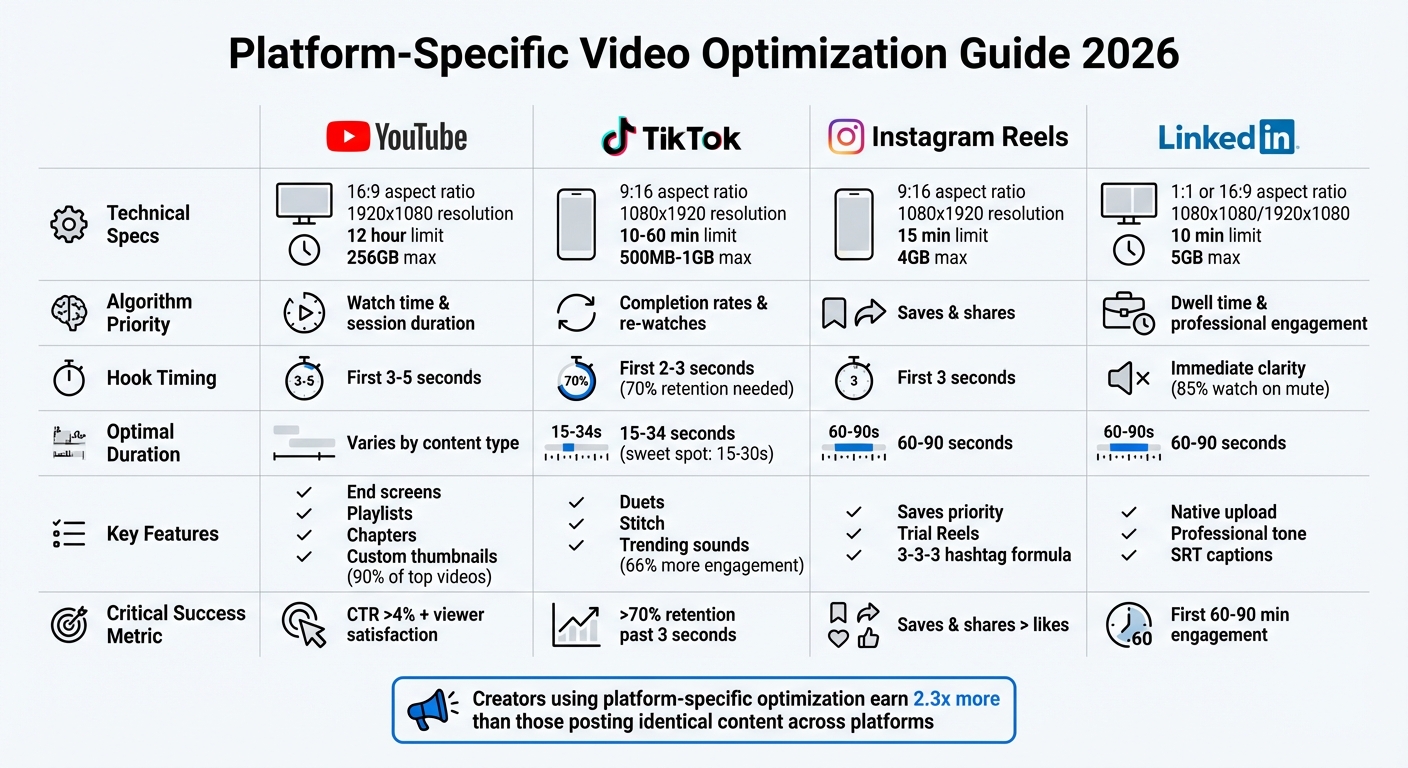
Platform-Specific Video Optimization Requirements: YouTube, TikTok, Instagram Reels & LinkedIn
This table brings together the essential technical details for various platforms, helping you ensure your videos meet the required standards. Use it as a quick reference to tailor your content for each channel.
Specifications for Each Platform
Each platform has unique technical guidelines and audience preferences. Meeting these specifications can improve video load times by up to 50% while ensuring compliance with platform rules.
Platform
Aspect Ratio
Optimal Resolution
Duration Limit
Max File Size
Hook Timing
Key Engagement Features
YouTube (Standard)
16:9
1920 x 1080 (up to 8K)
12 hours
256 GB
First 3–5 seconds
Remix, Subscriptions, Community Posts
YouTube Shorts
9:16
1080 x 1920
3 minutes
256 GB
First 3 seconds
#Shorts tag, Trending Audio
TikTok
9:16
1080 x 1920
10–60 minutes
500 MB – 1 GB
First 2–3 seconds
Duets, Stitch, Trending Sounds
Instagram Reels
9:16
1080 x 1920
15 minutes
4 GB
First 3 seconds
Saves, Stickers, Collabs
LinkedIn Video
1:1 or 16:9
1080 x 1080 / 1920 x 1080
10 minutes
5 GB
Immediate (Clarity)
Professional Networking, Polls
The vertical 9:16 format is the clear leader for mobile-friendly short-form videos, projected to dominate 95% of mobile consumption by 2026. Always export videos as MP4 files using H.264 encoding with VBR and 2-pass settings for optimal quality.
To maximize engagement, center critical visuals to avoid interference from platform UI elements. Since a large percentage of users - 85% on Facebook and 80% on LinkedIn - watch videos without sound, it's crucial to include captions. Either burn them directly into the video or upload SRT files.
Following these guidelines ensures your videos are ready for pre-publishing checks across all platforms.
Pre-Publishing Checklist
Before you hit publish, take a moment to go through these essential checks. They’ll help you catch any technical hiccups and set your video up for success across platforms.
Technical Quality Check
Make sure your video is exported as an MP4 file with the H.264 video codec and AAC-LC audio codec. This ensures compatibility across most platforms. If you’re uploading in 4K to YouTube, aim for a bitrate between 35–45 Mbps to preserve quality during compression.
Check that your resolution meets platform standards - at least 1080p (1920x1080 for horizontal or 1080x1920 for vertical). Preview your video on both desktop and mobile devices to confirm that audio syncs perfectly with visuals and that colors stay consistent across screens. Also, double-check that important text, logos, and visuals stay within the safe zone, so they’re not blocked by platform interface elements.
Avoid re-uploading any video that’s already been downloaded and compressed by another platform, as this can cause noticeable quality loss. Always work from your original high-quality export for the best results.
Accessibility Check
Captions aren’t just helpful - they’re essential. They can increase completion rates and improve your video’s reach. Instead of burning captions into the video, upload a separate SRT file. This makes the text crawlable by search engines, which can boost your video’s SEO.
You can use AI tools to generate subtitles, but always review them manually to ensure accuracy and proper timing. Include primary and secondary keywords in your captions to improve search visibility while providing helpful context. Additionally, check that your audio is clear and that your video’s contrast makes it easy for all viewers to engage, regardless of their needs.
With these steps complete, you’re ready to validate your video concept to make sure it’s hitting the right audience.
Validating Video Ideas with Outlier
Before production, use data to confirm your video idea’s potential. Tools like Outlier can identify "outlier" videos - those that perform 3x to 10x better than a channel’s average view count. These insights reveal topics and formats with strong audience demand and algorithmic favor.
Outlier’s Content Matrix helps you map topics and formats, highlighting areas where demand is high and competition is low. The platform’s AI-powered gap reports analyze competitor videos and provide insights on high-performing content strategies. This eliminates the need for manual spreadsheet analysis. Study successful titles, thumbnails, and performance metrics to uncover patterns - like specific emotional hooks or power words - that resonate with your target audience.
This data-driven method ensures your content aligns with what the 2026 YouTube algorithm prioritizes, such as viewer satisfaction and session contribution. With Outlier delivering actionable insights in just two minutes, you can fine-tune your video concepts and optimize your metadata before publishing.
Conclusion
Optimizing for specific platforms isn't just a nice-to-have anymore - it’s what separates content that fades into the background from content that stands out. The stats back it up: 78% of top creators adjust their strategies for each platform. Why? Because every platform has its own rules, audience habits, and priorities. YouTube prioritizes viewer satisfaction and retention, TikTok rewards high completion rates, and LinkedIn values meaningful conversations and professional insights.
The good news? You don’t need to completely overhaul your message for every platform. Instead, focus on how people engage with content in each space. Start with one main idea, then tweak it for different formats - create quick hooks for TikTok, retention-driven scripts for YouTube, and professional takes for LinkedIn. This modular approach, which is outlined in the earlier checklists, helps you expand your reach without wasting time on repetitive efforts.
Here's something to consider: Creators who actively post on 3–5 platforms earn 2.3x more than those who stick to just one. Use the checklists provided in this guide to kick things off, and let performance metrics shape your next steps. Track platform-specific KPIs weekly - like save rates on Instagram, completion rates on TikTok, or viewer satisfaction on YouTube - and adjust your strategy monthly. This approach gives you a structured way to steadily improve your content’s performance across multiple platforms.
Action Plan
Ready to start optimizing your content? Here’s how to dive in.
- Choose one platform where you already see some traction and apply its optimization checklist to your next three videos. Review the results, figure out what’s working, and then gradually expand to another platform. By focusing on one platform at a time, you can build a strong, manageable system.
- Make it a habit to check your analytics weekly and conduct a full content review every 90 days. Look for trends, gaps, and opportunities. Tools like Outlier can help you validate video ideas before you even start production, ensuring you're creating content that aligns with what the algorithm is favoring.
FAQs
How can I repurpose one video for YouTube, TikTok, Reels, and LinkedIn without losing reach?
To share a video effectively across platforms like YouTube, TikTok, Reels, and LinkedIn, it's important to tweak it for each platform's unique style and audience.
- Start with a flexible core video that can be broken into bite-sized clips for different uses.
- Remove any watermarks and make use of platform-specific tools, such as captions or trending music.
- Adjust the video length, include attention-grabbing hooks, and fine-tune captions to match each platform's vibe.
- Share the content at peak times to maximize engagement.
Which metrics should I track on each platform to know what to fix next?
To pinpoint areas for improvement, focus on these essential metrics:
- Watch time and audience retention: These reveal what keeps viewers engaged and where they might lose interest.
- Engagement signals: Metrics like likes, shares, and comments show how well your content resonates with your audience.
- Platform-specific metrics: Pay attention to details like early engagement or swipe-through rates, which can vary by platform.
- Search relevance: This helps you understand how discoverable your content is in search results.
- Recommendation metrics: Data such as session duration highlights how your content performs within platform algorithms.
Tracking these will give you a clearer picture of what’s working and what needs adjustment.
Should I use burned-in captions or upload SRT captions for better performance?
Uploading SRT captions instead of burned-in captions is a smarter choice for better performance. Why? SRT files help platforms like YouTube improve SEO indexing, making your content easier to find and boosting its ranking in search results.
While burned-in captions can still enhance engagement and accessibility for viewers, SRT captions take it a step further by optimizing your video's search visibility. This makes them a more effective option for reaching a larger audience.


