

5 Steps to Categorize YouTube Comments Effectively
Analyzing YouTube comments can feel overwhelming, but it doesn't have to be. By following five structured steps, you can transform scattered feedback into meaningful insights:
- Extract Comments: Use the YouTube Data API to retrieve comments efficiently, exporting them as CSV or JSON for analysis.
- Clean the Data: Remove spam, duplicates, and irrelevant content. Standardize text by converting to lowercase, removing special characters, and isolating specific languages.
- Define Categories: Classify comments by sentiment (positive, negative, neutral, mixed), topics (questions, suggestions, complaints), and actionable tags (needs reply, video idea, etc.).
- Apply Classification: For small datasets, manual tagging works. For larger ones, machine learning models like VADER or Logistic Regression automate categorization.
- Analyze Results: Use sentiment metrics, topic trends, and visualizations (charts, word clouds) to uncover patterns and refine your content strategy.
These steps save time, improve community management, and help you create content that resonates with your audience.
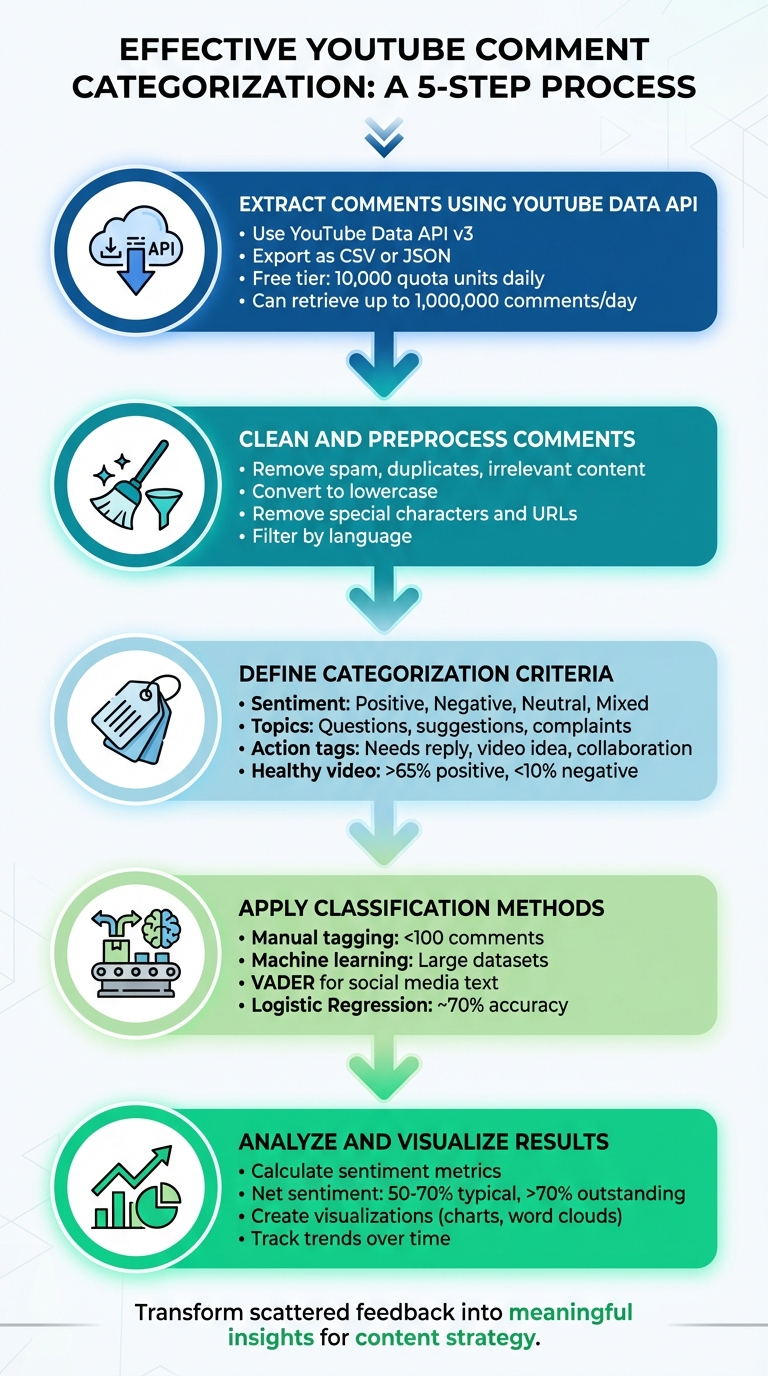
5-Step Process to Categorize YouTube Comments Effectively
Step 1: Extract Comments Using YouTube Data API
Using the YouTube Data API
The YouTube Data API v3 makes it possible to programmatically extract public comments from videos. To get started, you'll need to set up a Google Cloud project, enable the YouTube Data API v3, and generate an API key. For basic tasks like retrieving comments, an API key is sufficient, but if you're planning to manage channels, you'll need OAuth 2.0.
To pull comments, use the commentThreads.list method. Key parameters include:
part=snippet: Retrieves comment details (addrepliesif you need thread replies).videoId: Specifies the target video.maxResults=100: Controls the number of comments per request (up to 100).
Each commentThreads.list call costs 1 quota unit, and the free tier offers 10,000 units daily. This means you can retrieve up to 1,000,000 comments per day if your code is optimized.
"The commentThreads.list endpoint is the backbone of any serious YouTube comment pipeline, and getting it right means understanding its parameters, quota costs, pagination behavior, and failure modes in detail." - CommentShark Team
For videos with over 100 comments, use the nextPageToken to paginate through additional results. Set the textFormat parameter to plainText to avoid dealing with HTML tags. If a thread has more than five replies, you'll need to make a separate comments.list call using the parentId parameter to fetch the rest of the replies.
Organizing Comments for Analysis
Once you've retrieved the comments, export the data in a format that suits your needs. Use CSV for tools like Excel or Google Sheets, or JSON if you want to preserve nested reply structures. Key fields to include are:
comment_idauthor_display_nametext_originallike_countpublished_atvideo_id
To keep your API key secure, restrict its use in the Google Cloud Console. You can limit it to specific IP addresses or restrict it to only work with the YouTube Data API v3.
With your comments exported and organized, you’re ready to move on to cleaning and preparing the data for further analysis.
sbb-itb-08cadfc
Step 2: Clean and Preprocess Comments
Removing Spam and Irrelevant Data
Preprocessing is crucial for ensuring feedback categorization is accurate. Start by filtering out spam, duplicates, and irrelevant comments to maintain the quality of your data. Use YouTube Studio's built-in tools to help with this process. For instance, enabling the "Hold potentially inappropriate comments for review" setting and adjusting its strictness can automatically catch obvious spam. You can also create a blocked words list with phrases like "WhatsApp me", "free gift card", or "check out my channel" to identify promotional spam. Look for patterns such as excessive links, repeated text, and generic promotions. For persistent offenders, YouTube's "Hidden Users" feature is a handy option. It shadow bans users, making their comments visible only to themselves.
After tackling spam, remove duplicate comments using tools like Pandas' drop_duplicates() function. Filter out extremely short comments (e.g., those under three words) as they usually lack meaningful feedback. If your focus is on feedback in a specific language, use the langdetect library to isolate comments written in English.
Text Cleaning Techniques
Once irrelevant content is removed, standardize the remaining comments to prepare them for analysis. Start by converting all text to lowercase, ensuring that "Great" and "great" are treated the same. Use tools like RegEx and the demoji library to clean up special characters, non-alphanumeric symbols, and emojis. Additionally, strip out URLs, external links, and stop words (using libraries like nltk) to focus on the core feedback.
These preprocessing steps significantly improved a Logistic Regression model's performance, achieving 97.9% training accuracy and 89.7% test accuracy.
With your comments cleaned and standardized, you're ready to define the criteria for categorization.
Step 3: Define Categorization Criteria
Setting Up Categories
To make sense of your feedback, start by organizing it into clear categories. Using your cleaned data, focus on three main types of classification: sentiment, topic, and actionable tags.
Begin with sentiment classification to understand the emotional tone of the feedback. Break it down into these categories: Positive (compliments or praise), Negative (complaints or criticism), Neutral (straightforward questions or factual comments), and Mixed (a combination of positive and negative points). For example, a question like "What software is this?" is Neutral, while a comment like "Great tutorial, but the audio quality could improve" would fall under Mixed. As a guideline, a healthy video typically has over 65% positive comments and less than 10% negative ones.
Next, add topic-based categories to pinpoint what your audience is discussing. These might include product-related questions, feature requests, technical issues, comparisons with competitors, or suggestions for future content. Tailor these topics to match the focus of your channel. For instance, long-form videos, which average around four comments per video, are great for clustering comments by topic. Meanwhile, YouTube Shorts, which typically get fewer comments, are better suited for quick sentiment checks.
Finally, introduce action-oriented tags to determine what kind of response each comment requires. Use labels like "Needs reply", "Collaboration offer", "Video idea", or "Fan appreciation". This approach transforms your comment section into a tool for engagement and business growth. You can even set up a triage system to prioritize responses. For example, label urgent business inquiries as Priority 1 (respond within an hour) and less critical comments, like emojis or one-word replies, as Priority 4.
Creating Consistent Guidelines
To streamline the process, use keyword triggers. For instance, comments containing words like "buy", "price", or "link" can be tagged as "Product Question", while those starting with "how", "what", or "why" can be categorized as questions. This simplifies classification. If a comment has multiple intents - like a question hidden within broader feedback - prioritize tagging it as a question to ensure viewer inquiries are addressed.
Keep in mind that automated sentiment analysis tools usually achieve 70% to 85% accuracy on general text, but YouTube comments can be tricky due to sarcasm and slang. Your guidelines should account for context. For example, a phrase like "this is sick" should be recognized as positive rather than toxic. Don’t forget to include emoji analysis in your process. Emojis often convey emotions, humor, or sarcasm that plain text might miss.
Once your guidelines are set, you’ll be ready to apply these classification methods for more accurate and actionable categorization.
Step 4: Apply Classification Methods
Now that your data is cleaned and guidelines are in place, it's time to apply classification methods to organize your comments efficiently.
Manual Tagging for Small Datasets
If you're working with a smaller dataset - around 100 comments or fewer - manual tagging is often the best option for accuracy. Start by exporting your comments into a CSV or Excel file. Create columns for categories like "Needs reply", "Product question", "Video idea", "Collaboration", "Fan appreciation", "Constructive feedback", and "Spam/review". You can make the process smoother by using Excel tools like filters or formulas such as =COUNTIF or =REGEXMATCH to spot keywords quickly.
To streamline your workflow, rely on the triage guidelines set earlier. Batch similar comments - for instance, all product-related questions - and address them together. This approach can save time, making it 3-5 times faster than responding to individual comments scattered throughout the day.
However, manual tagging isn't practical for larger datasets. That's where machine learning steps in.
Using Machine Learning Models
For datasets with thousands of comments, machine learning models are essential. These models, built on your cleaned data, can automate the classification process. A good starting point is VADER (Valence Aware Dictionary and sEntiment Reasoner). It's a rule-based model designed for social media text and can handle emojis and informal language effectively. If you're looking for a straightforward algorithm, Logistic Regression is a solid choice, often achieving around 70% accuracy, outperforming alternatives like Naive Bayes, CNN, and RNN.
Before feeding data into a model, revisit the cleaning steps. Use Python libraries to:
- Remove emojis with
demoji - Filter for English comments using
langdetect - Eliminate special characters with Regular Expressions
Next, turn text into numerical data using tools like CountVectorizer or TF-IDF vectorization. Split your dataset into an 80/20 ratio for training and testing. For more advanced analysis, LSTM models are excellent for understanding the context within comment threads. Another option is the Google Cloud Natural Language API, which offers a free tier of 5,000 units monthly and delivers professional-grade accuracy (80-90%).
"The extensive user engagement on YouTube leads to a flood of comments, creating challenges for content creators who aim to understand audience sentiment." - IEEE
Step 5: Analyze and Visualize Results
Take the categorized comments and transform them into insights you can act on. Start by calculating sentiment metrics like net sentiment (Positive minus Negative divided by Total), Positive Ratio, and Negative Ratio. For reference, a net sentiment between 50–70% is considered typical, while anything above 70% is outstanding.
Aggregating and Summarizing Data
Group comments into common themes such as feature requests, technical issues, or content ideas - this helps you pinpoint the main topics driving engagement. To measure audience polarization, calculate the Comment Controversy Score (CCS) by multiplying sentiment variance with the average number of likes. A study by data analyst Debadrita Deb in February 2026 analyzed 1,878 YouTube videos and revealed that videos with high comment controversy ranked in the 79th percentile for views, compared to just the 29th percentile for low-controversy videos.
Use subjectivity scores (ranging from 0.0 for objective to 1.0 for subjective) to filter out spammy, bot-like comments and focus on authentic feedback. Track sentiment trends over time to identify shifts in audience mood or emerging trends. You can also use regex patterns to extract questions (like those starting with "how", "what", or "why") and compile a prioritized FAQ list for future content ideas.
Visualization Techniques
Once your data is summarized, it’s time to make it visually compelling. Visualization simplifies complex trends and helps your team grasp key insights quickly. Use Python libraries like Matplotlib or Seaborn for static charts, and Plotly for interactive dashboards.
Here are some effective visualization methods:
- Histograms and pie charts: Show sentiment distributions clearly.
- Line charts with rolling averages: Highlight how sentiment evolves over time (e.g., a 20-period rolling mean).
- Boxplots and heatmaps: Display topic frequencies and engagement correlations.
- Word clouds: Separate positive and negative word clouds to reveal emotional drivers at a glance.
For even more impact, tools like Streamlit let you turn your analysis scripts into shareable web apps. This makes it easier to present findings to your team or community. These insights not only help refine your content strategy but also align seamlessly with Outlier's data-driven recommendations for optimizing YouTube videos.
Using Outlier for Data-Driven Content Strategy
Outlier takes your comment categorization process to the next level, turning raw data into strategic content ideas. Once you've sorted through your comments, this tool helps you pinpoint actionable video concepts by analyzing competitor channels. It identifies "outlier videos" - those performing 3 to 20 times better than the average content on a channel.
The platform uses AI-driven comment intelligence to uncover key pain points and recurring feedback themes in comment sections. It also highlights topics that are being overlooked by competitors. This feature complements your manual analysis, validating the trends you've already spotted while showing how they drive engagement across similar channels. Outlier then integrates these insights into a Content Matrix, which matches trending topics with video formats. This reveals untapped content areas and provides evidence of what topics are likely to resonate with your audience.
Time is critical in content strategy, and Outlier saves you hours. What used to take 2–4 hours of competitor research can now be done in under 30 minutes. The tool delivers outlier scores, suggested titles, hooks, and confidence scores based on view velocity data. As Aditi, Founder of OutlierKit, puts it:
"The AI handles the data extraction; you handle the creative strategy"
For creators aiming to grow on YouTube, Outlier's Topic Performance Intelligence predicts how well a particular content angle might perform before you even start production. With a 4.9/5 rating on Product Hunt, it’s clear that this tool excels at uncovering insights others might miss. Starting at just $9 per month and offering a free trial, it’s a practical choice for creators at any level.
Conclusion
Organizing YouTube comments doesn't have to be overwhelming. By using a structured approach, you can turn scattered feedback into a clear list of your audience's interests and challenges. This method provides a roadmap for creating content based on what your viewers are already talking about.
The value of this process lies in transforming raw feedback into actionable insights. Popular first-page videos often attract over 4,000 comments, each offering a glimpse into what resonates with your audience and the themes driving conversations.
But remember, this isn't a "set it and forget it" process. Viewer preferences shift, competitors adapt, and YouTube's algorithm evolves. As Aditi, Founder of OutlierKit, points out:
"A one-time audit has a 90-day shelf life".
To keep up, plan quarterly reviews to refine your categories and adjust your content strategy based on fresh data.
Efficiency is just as important as accuracy. Tasks that used to take hours can now be done in minutes with tools like Outlier, which highlights videos performing three times better than average to identify key growth drivers.
Looking ahead to 2026, success will depend on strategy. Continuously improving your categorization process and using AI-powered insights will help you stay competitive. This way, you'll identify untapped opportunities and create content that truly connects with your audience.
FAQs
Do I need OAuth or just an API key to pull comments?
To access YouTube comments, you'll generally use the YouTube Data API v3 along with an API key. The good news? You only need OAuth 2.0 if you’re planning to modify or post comments. For simply reading or extracting comments, having an API key is enough. So, if your focus is just on retrieving comments without making any changes, you can skip OAuth entirely.
How can I handle sarcasm and slang in sentiment labels?
Handling sarcasm and slang in sentiment analysis is no easy task. Sarcasm, for instance, can mask or even flip the true sentiment of a comment by using exaggerated positivity, irony, or even specific punctuation. Slang, on the other hand, demands a grasp of informal and ever-evolving language. To tackle these challenges, models that consider context, conversation history, and subtle discourse cues play a critical role. Leveraging machine learning techniques can significantly enhance the accuracy of classifying sentiments in such tricky scenarios.
When should I switch from manual tagging to machine learning?
When the volume of comments on your platform grows beyond what you can manage manually, it's time to consider machine learning. This approach allows for more precise, scalable, and automated categorization of your data. However, the transition should be strategic - don’t just automate for the sake of it. Without a clear plan, automation can end up doing more harm than good to your channel.
Machine learning tools shine when it comes to handling large datasets efficiently. They not only process information quickly but also provide insights you can act on, making them invaluable for intelligent data management.


