

Ultimate Guide To YouTube Comment Engagement
Want to grow your YouTube channel? Start with your comments section. Engaging with your audience through comments can boost your video rankings, increase watch time, and build a loyal community. Here's how:
- Why it matters: YouTube ranks videos based on engagement. More comments = better visibility.
- How it helps: Channels that actively respond to comments see faster growth. Example: A channel grew subscribers by 200% in 6 months by engaging with viewers.
- What to do: Use tools to filter spam, reply quickly (especially within the first 24 hours), and ask specific questions to spark discussions.
- Key strategies: Moderate effectively, reply thoughtfully, and use comments as inspiration for new video ideas.
Your comments section isn't just a space for feedback - it's a tool for growth. Learn how to set it up, track engagement, and turn casual viewers into dedicated fans.
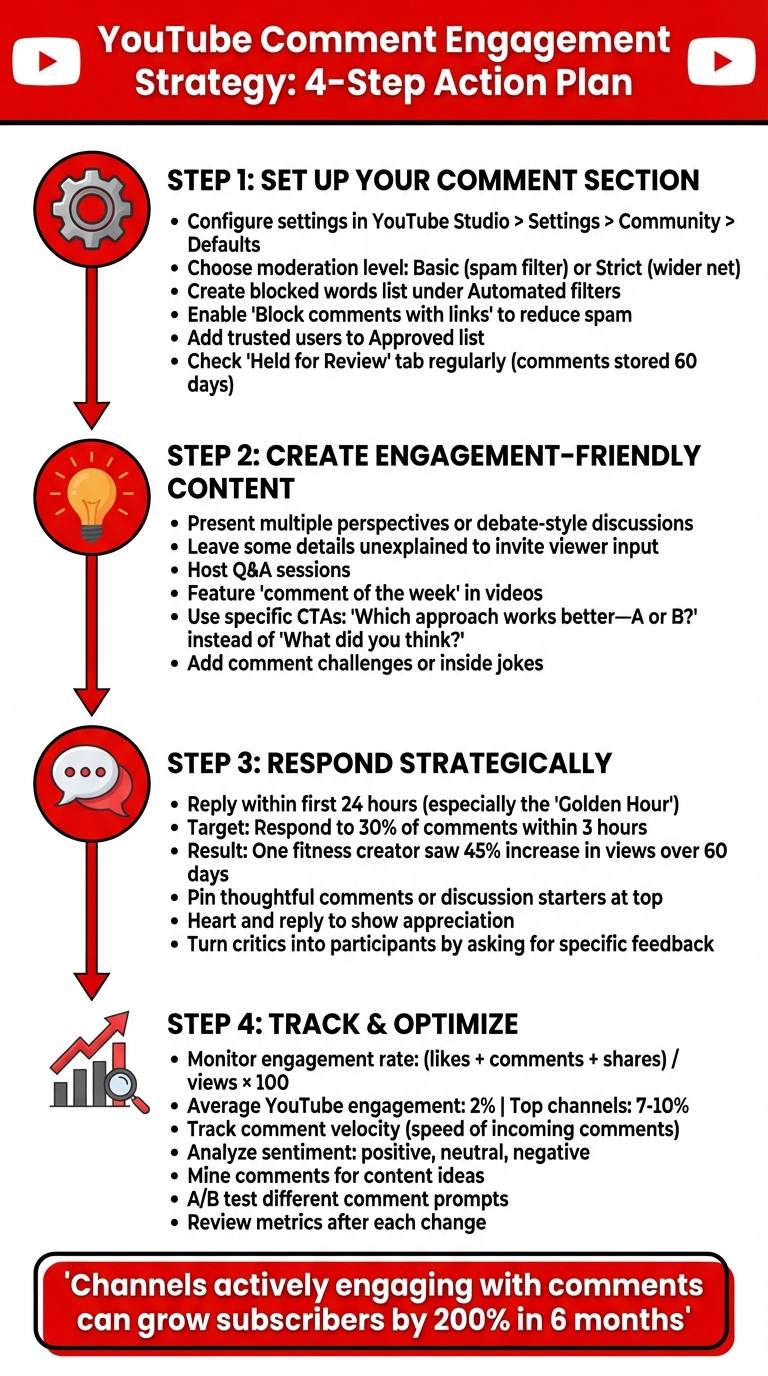
YouTube Comment Engagement Strategy: 4-Step Action Plan
Setting Up Your Comment Section for Success
Configuring Your Channel and Video Settings
YouTube gives you the flexibility to manage comments at both the channel and video levels. To set your default comment status (On, Paused, or Off), head to YouTube Studio > Settings > Community > Defaults [13, 17, 19].
If you need to override these settings for a specific video, you can do so in YouTube Studio's Content settings [17, 19]. Additionally, you can choose how comments are displayed - either by Top comments or Newest first - to influence what viewers see right away. Keep in mind, comments are automatically disabled for videos marked as "made for kids" or those set to private. If you want limited visibility while keeping comments enabled, opt for the "unlisted" setting instead [17, 19].
Want to limit comments to your subscribers or members? You can do this by setting a minimum subscription duration, such as 1 hour, 1 day, or even 1 week. Once your settings are in place, it’s time to dive into moderation.
Setting Up Moderation Rules
YouTube’s automatic moderation tools are a great first line of defense. When comments are turned On, you can select either Basic or Strict moderation modes. The Basic setting catches potentially inappropriate comments like spam, while Strict casts a wider net to filter out more problematic content.
To take moderation a step further, create a custom Blocked words list under YouTube Studio > Settings > Community > Automated filters. Add specific words, phrases, or emojis you want to block. Make sure to separate entries with commas (no spaces after commas) while keeping spaces intact for multiword phrases [13, 18].
In January 2025, Diana Sienkiewicz of dreamlikediana.com shared how she used these tools to shield herself from negative comments targeting her appearance and life choices. By setting up filters to catch harmful remarks, she was able to focus on her content. As she explained:
"The goal isn't to silence all feedback, it's to create space for meaningful connection."
For additional protection, enable the Block comments with links option. This holds comments containing URLs for review, helping to reduce spam and phishing attempts [13, 18]. If you have trusted community members, you can add them to your Approved users list so their comments bypass moderation filters. On the flip side, persistent troublemakers can be added to the Hidden users list, which hides their comments across your channel.
Don’t forget to check the Held for Review tab regularly. This is where comments flagged by your filters will appear, giving you the chance to approve legitimate ones or delete harmful ones. Comments in this section are stored for up to 60 days [13, 22].
Creating a Positive Comment Culture
Building a welcoming and engaging comment section starts with your own involvement. In February 2025, AIR Media-Tech shared the story of a fitness creator who made a habit of replying to 30% of comments within three hours of posting. This approach strengthened audience relationships and even helped boost video reach.
You can also set the tone by pinning a comment at the top of your section. This could be a thoughtful question, a discussion starter, or key information about the video. Posting a "seed comment" immediately after uploading can encourage specific types of interaction and foster a positive atmosphere.
Show your appreciation by hearting and replying to comments [5, 15, 16]. For example, in February 2025, a tech creator addressed criticism about a new video format by responding:
"I hear you – what specific features would you like to see in the next video?"
This thoughtful reply not only made viewers feel heard but also encouraged them to engage further, helping shape future content.
Lastly, recognize your most active community members. Highlight insightful comments in your videos or respond to their suggestions directly. These small gestures can make viewers feel valued, turning occasional commenters into loyal fans [16, 24].
How to Get More Comments on Your Videos
Creating Videos That Encourage Comments
Once you've established a positive comment culture, the next step is designing content that actively encourages viewers to engage. The key? Make your videos naturally invite discussion. When content feels authentic and relatable, viewers are more likely to share their thoughts and opinions.
Consider presenting multiple perspectives or hosting debate-style discussions on trending topics. These formats work especially well for subjects that spark conversation rather than offering a single "right" answer. For instance, you could explore "best practices" for a particular challenge or compare different approaches to solving a common problem.
Another effective strategy is to leave some details unexplained, encouraging viewers to chime in with their expertise or opinions. Hosting Q&A sessions is another way to directly involve your audience - these sessions prompt questions and keep the dialogue flowing. To make viewers feel even more valued, consider featuring a "comment of the week" in your videos. This not only rewards engagement but also motivates others to participate.
Once your content is designed to spark interaction, the next step is integrating specific calls-to-action to guide viewers toward leaving comments.
Using Comment Calls-to-Action in Your Videos
Strategically placed calls-to-action can make a big difference in driving engagement. Instead of vague prompts like "What did you think?", ask more targeted questions. For example: "Which approach do you think works better - option A or option B?" Such specific questions make it easier for viewers to respond.
Wrap up your videos by posing direct questions tied to the content. Encourage viewers to share their personal experiences or opinions on the topic - this gives them a clear reason to comment. You can also add fun elements like comment challenges or recurring inside jokes to create a sense of community. When commenting feels like an active part of the experience, viewers are more likely to engage.
Once you've mastered these techniques, you can take it a step further by using data to fine-tune your comment prompts.
Using Data to Create Better Comment Prompts
Understanding your audience is crucial for crafting effective comment prompts. Tools like YouTube Analytics offer valuable insights into viewer behavior - such as demographics, watch time, traffic sources, and engagement metrics like likes and comments. These insights help you align your content strategy with what resonates most with your audience.
Dive deeper into your comment analytics to identify patterns. Which videos spark the most discussion? Are viewers responding more to personal stories, technical debates, or practical advice? Pinpointing these trends allows you to refine your approach and create content that invites even more interaction.
For a faster and more targeted analysis, tools like Outlier (https://outlier.so) can be incredibly helpful. Outlier analyzes competitor content and engagement trends, providing personalized video ideas - complete with suggested titles, hooks, and confidence scores - in just a couple of minutes. By reviewing competitor content from the past 90 days, you can identify topics that are already driving discussions in your niche. This data-driven approach eliminates the guesswork and helps you craft prompts designed to spark meaningful conversations.
Using these insights, you can not only boost comments on your videos but also shape a broader strategy to grow your channel.
Managing Comments and Using Them for Growth
How to Respond to Comments Efficiently
The first 24 hours after posting a video are crucial for engagement, especially the "Golden Hour." Quick responses to early comments can signal value to YouTube's algorithm, increasing your video's visibility. For instance, a fitness creator who replied to comments within the first hour saw a 45% increase in views over 60 days.
YouTube Studio makes this easier by letting you reply to all unanswered comments from one page. While speed is important, quality matters too. Avoid generic replies - craft thoughtful responses that address questions or offer additional insights. One fitness creator managed to respond to 30% of comments within the first three hours, maintaining both speed and value.
When dealing with criticism, take a professional and transparent approach. One tech creator, for example, responded to feedback about a format change by asking viewers what specific improvements they wanted to see. This strategy turned critics into active participants who felt heard. For negative comments, focus on empathy and constructive solutions. If you spot misinformation, correct it calmly and respectfully, steering clear of defensiveness.
Quick, thoughtful responses not only enhance engagement but can also provide valuable insights for future content.
Mining Comments for Content Ideas
Your comment section is a goldmine for future video ideas. Viewers often share what they want to see, highlight confusing points, or suggest topics they find interesting. By paying attention to recurring questions or suggestions, you can spot content gaps and identify areas worth exploring further.
Look for patterns in your most popular videos. Are viewers asking for more details on certain topics or requesting follow-ups? Encourage this kind of feedback by asking open-ended questions rather than sticking to simple thank-yous. This approach can reveal what your audience is most curious about.
YouTube Analytics is another powerful tool. It can show which videos spark the most discussion, helping you turn viewer feedback into collaborative content ideas.
Turning Comments Into Community Content
Involving viewers as co-creators can deepen community bonds and sustain engagement. Some creators highlight standout comments in their next videos, acknowledging valuable insights and using them as a starting point for further discussions. This not only shows you’re paying attention but also encourages meaningful contributions.
Featuring viewer input in follow-up videos demonstrates that their feedback shapes your content. You could even dedicate entire videos to popular comment themes or frequently asked questions, making your audience feel truly valued.
Adding interactive elements like inside jokes or "comment challenges" can create a sense of belonging. When viewers see their contributions featured or referenced, they’re more likely to engage again. Over time, this transforms casual viewers into loyal fans who feel personally connected to your channel’s success.
sbb-itb-08cadfc
Tracking and Improving Comment Engagement
Key Comment Engagement Metrics to Track
Tracking the right metrics can reveal how well your content connects with viewers. While raw comment counts show basic interaction, calculating the engagement rate (likes + comments + shares divided by total views or subscribers × 100) offers a clearer picture. For reference, the average engagement rate on YouTube sits around 2%, but top-performing channels often hit between 7% and 10%.
Another important metric is comment velocity - the rate at which comments pour in after a video is published. This can signal how quickly your content sparks conversations. Additionally, keep an eye on subscriber changes after posting engaging videos. This helps identify which content not only engages but also converts casual viewers into loyal followers. Comparing engagement rates across various video types can also highlight what resonates most with your audience. Together, these metrics provide a starting point for evaluating the quality of comments.
Evaluating Comment Quality and Sentiment
Numbers alone don’t tell the full story. To dig deeper, sentiment analysis can classify comments as positive, neutral, or negative. Instead of manually reading every comment, try grouping them into categories like questions, suggestions, praise, or criticism. This approach allows you to spot trends that raw data might overlook.
Recurring themes across multiple videos can reveal areas for improvement. For instance, if viewers repeatedly ask similar questions or express confusion about a topic, it’s a cue to clarify or expand on that content. As expert Joanne Sweeny puts it:
"Be able to tell the story of insights: what and why it matters to the goals of the organization".
Tools like YouTube Studio offer basic filters and search functions, while platforms like Brand24 provide more advanced sentiment analysis and topic tracking. Focus on consistent feedback patterns rather than isolated comments to establish a baseline sentiment and track changes over time.
Testing and Refining Your Comment Strategy
Once you’ve gathered insights, it’s time to refine your approach. Experiment with different comment prompts - try targeted questions or open-ended prompts - to see what sparks richer discussions. As Joanne Sweeny advises:
"Be able to tell the story of insights: what and why it matters to the goals of the organization".
You can also run A/B tests on elements that influence commenting behavior. For example, experiment with the placement of call-to-action prompts or pin different types of comments to the top of your video’s comment section. See which tactics lead to more engagement. Social media strategist Dorien Morin-van Dam highlights the importance of monitoring these changes:
"Check your data each time you implement changes because you want to be able to track results, even from small tweaks!".
Use YouTube Analytics to measure how these adjustments impact engagement metrics over time. If you’re testing comment prompts tied to trending topics, tools like Outlier can help analyze competitor content and view velocity patterns. Pair sentiment data with watch time and retention metrics for a more complete understanding of your strategy’s effectiveness. As Luis David Fernandes, global social media strategist at Acolad group, advises:
"Take your time to analyze data, and you'll get everything you need to know".
Fine-tuning your comment strategy not only boosts engagement but also drives overall channel growth.
8 Tips & Tricks To Get Comments & Engagement For YouTube Beginners
Conclusion: Your YouTube Comment Engagement Action Plan
Every comment on your channel is more than just words - it's a chance to grow your audience and build a stronger community. An active, engaging comment section not only fosters connection but also sends positive signals to YouTube's algorithm, increasing your visibility in search results and recommendations. By creating content that naturally encourages viewers to share their thoughts, you're laying the groundwork for meaningful interaction and channel growth.
Managing your comment section effectively can turn it into a thriving hub of activity. Aim to respond within the first 24–48 hours after uploading a video to capitalize on peak visibility. Use comments as a resource for content ideas that resonate with your audience's interests. Beyond just counting comments, dive deeper - track engagement rates and analyze sentiment to understand the tone and substance of what your viewers are saying. This mix of daily interaction and strategic insights is key to long-term success.
Regularly review your comment metrics to identify which topics spark the most conversations. Focus your efforts on strategies that consistently deliver results. Tools that analyze competitor content and audience trends can also help you fine-tune your approach, ensuring your strategy aligns with audience preferences and YouTube's algorithm.
FAQs
What’s the best way to manage and moderate comments on my YouTube channel?
Managing your YouTube comments effectively starts with utilizing YouTube’s built-in moderation tools. These features let you filter comments, review potentially inappropriate ones, hide problematic users, and establish default moderation settings. If managing everything yourself feels overwhelming, you can also assign trusted moderators to help keep an eye on the comment section and respond when needed.
To keep the environment positive, you might want to explore advanced tools that automatically detect and filter out spam or harmful content. Beyond moderation, actively engaging with your audience by replying to constructive comments can encourage meaningful conversations and help build a lively, supportive community.
How can I get more people to comment on my YouTube videos?
To get more comments on your YouTube videos, try asking specific questions in your video or description that spark genuine interaction. Focus on creating moments or topics that viewers will want to talk about. Be quick to respond to comments - this shows you're actively engaged and encourages more participation. Highlighting standout comments by pinning them can also inspire others to join the conversation. Another idea? Host fun contests or challenges where commenting is part of the entry process. Open-ended questions are especially effective for keeping the discussion lively and ongoing!
How can I use YouTube comments to come up with new video ideas?
YouTube comments hold a treasure trove of inspiration for fresh video ideas. Look out for recurring questions, suggestions, or topics that your viewers bring up. Engaging with your audience by replying to their comments and asking open-ended questions can spark meaningful conversations and reveal valuable insights.
Another great approach is to create polls or challenges directly in the comments section to boost interaction and gather feedback. By staying tuned in to what your audience is saying, you'll better understand what they’re eager to watch, allowing you to create content that truly connects with them.


